As an Amazon affiliate, I earn from qualifying purchases.
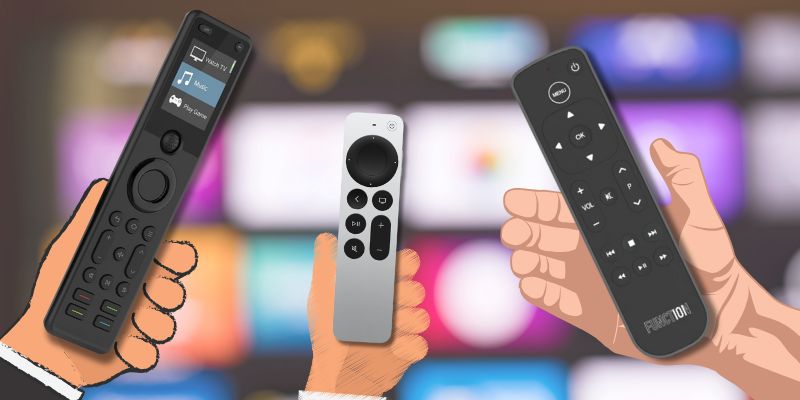
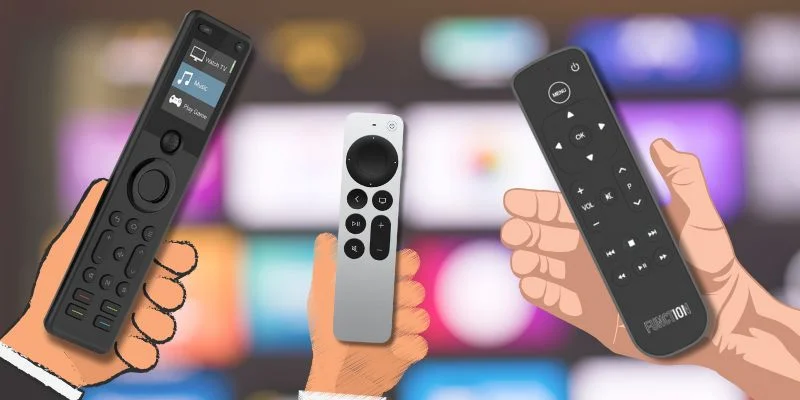
Here are the best remotes for Apple TV ranked by hands-on use, tactile control, home theater compatibility, and everyday navigation.
I Love My Apple TV, BUT
 Apple TV is one of the best streaming devices, but its remote has long frustrated users.
The 1st-gen Siri Remote’s glass trackpad lacked tactile control. Later versions added a circular clickpad, dedicated buttons, and USB-C charging, but many users still crave better ergonomics and functionality.
After testing and personally using five options, I narrowed down the best remotes for Apple TV available right now.
According to Parks Associates, 89% of U.S. households now use streaming media players, making smooth navigation essential. Let’s dive into my picks for the best remotes for Apple TV.
Comparison Table: Best Remotes for Apple TV
The following table highlights the key features of the best remotes for Apple TV side by side for my top picks.
| Best Siri Alternative | Apple Official | Premium Pick | Scroll-Wheel Universal | Multi-Device | |
|---|---|---|---|---|---|
| Product Image |

|

|

|

|

|
| Model | Function101 Button Remote | Apple TV Siri Remote | SofaBaton X2 | SofaBaton U3 | SofaBaton X1S |
| Rank | 1 | 2 | 3 | 4 | 5 |
| Best Fit | Best fitChoose this if you want traditional apple tv buttons. | Best fitChoose this if you want siri and gestures. | Best fitChoose this if you want whole-room touchscreen hub. | Best fitChoose this if you want tactile apple tv room control. | Best fitChoose this if you want value hub control. |
| App Control | |||||
| Control | IR or Bluetooth edition | Bluetooth | IR, Bluetooth, RF, Wi-Fi hub | IR, Bluetooth/BLE, RF learning | IR, Bluetooth, Wi-Fi hub |
| Rechargeable | |||||
| Power | Replaceable batteries | USB-C rechargeable | Charging dock | 1200mAh USB-C | USB-C rechargeable |
| Voice | No Siri | Siri built in | Smart-home assistants | No Siri voice | Alexa and Google |
| Check Price | Check Price | Check Price | Check Price | Check Price | Check Price |
#1. Best Siri Remote Alternative: Function101
Key Features
- Device Control: Apple TV only
- Technology: New Bluetooth option (linked below)
- Voice Assistant: None
- Battery Type: Includes 2 AAA batteries
- Smart Features: Dedicated buttons for menu, volume control, and mute button
The Function101 Button Remote is one of the best remotes for Apple TV users who dislike the touchpad navigation on the latest Siri Remote. Designed to mimic a traditional remote, it has physical buttons, dedicated playback controls, and no unnecessary touch gestures.
The latest Bluetooth remote no longer relies on infrared technology, meaning line of sight is no longer required. The simple button layout makes navigating Apple TV more intuitive, and it even includes 2 AAA batteries!
MacRumors has a nice review of the Function101 remote out on YouTube. I’ll embed it below.
Pros
- No learning curve-just point and press
- Eliminates touchpad frustration
- Dedicated navigation, volume, and mute buttons
- Satisfying tactile click
- Responsive U.S.-based technical support
Cons
- No Siri voice commands
- No remote smartphone app integration
Function101 is offering my readers special savings on this remote. Click below for their latest deal, or shop at Amazon if you prefer.
#2. Official Pick: Apple TV Siri Remote
Key Features
- Device Control: Apple TV only
- Technology: Bluetooth & IR
- Voice Assistant: Siri button for voice recognition
- Battery Type: Rechargeable via USB-C
- Smart Features: Touchpad navigation, control center access, and volume control
Next on my list of best remotes for Apple TV is Apple’s own improved remote from its first and 2nd generation offerings. The new 3rd-Gen Siri Remote is now Apple’s official remote replacement for Apple TV HD and Apple TV 4K. It features a better design, physical buttons, and a more intuitive clickpad compared to the previous model.
The new Siri button is located on the right side for easier access, and the outer ring of the touchpad allows for fast scrubbing through videos. It pairs automatically with Apple TV, making setup effortless.
Pros
- Significant improvement over the previous versions
- Siri voice commands improve accessibility
- Rechargeable battery eliminates disposable batteries
- Physical buttons make navigation easier
Cons
- Still lacks universal remote control features
- Premium price for minor design changes
The 3rd generation Apple TV Siri Remote offers precise control with a touch-enabled clickpad and USB-C charging for Apple TV 4K and HD.
#3. Premium Pick: Sofabaton X2
Key Features
- Device Control: Universal control across IR, Bluetooth, and Wi-Fi devices
- Display: Full color touchscreen for activities and device selection
- Voice Assistant: Alexa & Google Assistant compatible
- Smart Features: One-touch activities, customizable layouts, hub-based control
Disclosure: Sofabaton sent me the X2 to evaluate as a brand partner. I set it up recently and have been testing it daily.
The Sofabaton X2 is the new premium pick for Apple TV users who want a single remote to run an entire entertainment stack. The full color touchscreen replaces the OLED on the X1S and makes activity switching faster and more visual, while the underlying hub still handles IR, Bluetooth, and Wi-Fi devices side by side.
As one of the best remotes for Apple TV specifically, the X2 maps cleanly onto the standard playback and navigation buttons and lets you build a single activity that powers on the TV, switches the input, and hands control to Apple TV in one tap. Power users with multiple streaming boxes, a soundbar, and smart lights will get the most value out of the touchscreen and customizable controls.
I plan to release a full setup walkthrough soon on the X2 over at my @TecTimmy YouTube channel. Please subscribe!
Pros
- Full color touchscreen for activities and device selection
- One remote replaces several across IR, Bluetooth, and Wi-Fi devices
- Works with Alexa and Google Assistant
- Customizable layouts and one-touch activities
Cons
- Premium price compared to single-purpose remotes
- Initial activity setup takes time to dial in
The X2 is Sofabaton's new flagship remote with a touchscreen, charging dock, and improved smart home control.
Video Review
Here is a SofaBaton X2 unboxing I filmed over on my TecTimmy channel.
#4. Best Scroll-Wheel Universal: SofaBaton U3
Key Features
- Device Control: Compatible Apple TV, television, soundbar, and supported room gear
- Navigation: 2.4-inch non-touch LCD with scroll wheel
- Voice Assistant: No Siri; Google voice only on supported Bluetooth devices
- Smart Features: Three Bluetooth connections, one-touch macros, USB-C charging
Coming in at number 4 is the SofaBaton U3, my tactile universal pick among the best remotes for Apple TV.
Its 2.4-inch non-touch LCD uses a scroll wheel: turn to browse, press to select. After owning and testing numerous SofaBaton remotes, I like this familiar approach for supported gear.
If your Apple TV is connected to an LG television, I also put together a separate guide to the best remotes for LG TVs so you can match the streamer remote to the TV side of the room.
Keep the Siri Remote nearby for Siri voice. Google voice and Air Mouse require supported Bluetooth devices, and you should confirm the exact Apple TV profile before buying.
Pros
- 2.4-inch LCD with tactile scroll wheel
- Controls compatible Apple TV room gear
- Three Bluetooth connections and one-touch macros
Cons
- No Siri voice support
- Exact Apple TV profile requires verification
- Line-of-sight IR without optional R1
#5. Multi-Device Universal: Sofabaton X1S
Key Features
- Device Control: Up to 60 devices
- Technology: IR, Bluetooth, Wi-Fi
- Voice Assistant: Alexa & Google Assistant
- Smart Features: Macro programming, control center access, dedicated buttons
The Sofabaton X1 is one of the best remotes for Apple TV users with multiple devices. It can control up to 60 devices, including Apple TV, Roku, Fire TV, Smart TVs, and game consoles.

My SofaBaton X1S
This smart remote has infrared, Bluetooth, and Wi-Fi connectivity, allowing seamless switching between streaming devices, set-top boxes, and home theater systems. The dedicated buttons and customizable controls make it ideal for power users. It also has a learning feature so you can use it to control additional devices like air conditioners, fans, and fireplaces and rely on an IR remote.

My Fire TV and SofaBaton X1S
Here is a full setup video on the X1S that I filmed over at my @TecTimmy YouTube channel. Please subscribe!
Pros
- Perfect for Apple TV media players, video games, and smart TVs
- OLED screen for device selection
- Works with Alexa and Google Assistant
- Customizable remote app controls
Cons
- Expensive compared to basic remotes
- App setup has a bit of learning curve
SofaBaton is offering my readers $10 off the X1S remote. Click below and check the box on the Amazon product page to claim it.
Bonus Pick: BroadLink RM4 Pro

Key Features
- Device Control: Works with Apple TV, Smart TVs, Game Consoles, and Home Automation Devices.
- Technology: IR & RF (radio frequency) for wide compatibility.
- Voice Assistant: Alexa & Google Assistant integration.
- Battery Type: N/A – operates via app & Wi-Fi.
- Smart Features: Remote app control, automation, voice commands, scheduled routines.
The BroadLink RM4 Pro is a smart hub-based universal remote designed for users who prefer app-based controls instead of a traditional physical remote. Unlike standard Apple TV remote replacements, this device is one of the best remotes for Apple TV that doesn’t include a physical remote. Instead, it turns your smartphone into a remote with support for voice assistants like Alexa and Google Assistant.
It works with Apple TV, Roku, smart TVs, and even AV receivers, providing infrared and RF control to eliminate multiple remotes. If you’re deep into home automation, this remote hub can integrate with scene automation, scheduled routines, and remote access via the BroadLink app.
Pros
- Great option for smart home enthusiasts and automation setups
- Works with a wide array of products, including streaming boxes and smart TVs
- Voice commands supported via Alexa & Google Assistant
- Can replace multiple remotes for AV receivers and home theater systems
Cons
- No physical remote-requires smartphone or voice assistant to function
- Setup can be complicated for non-tech-savvy users

BroadLink RM4 Pro is a universal IR/RF hub and app with sensor support and Alexa compatibility.
How I Scored the Remotes
After personally testing all five of the best remotes for Apple TV, I ranked them based on six key factors to determine which models offer the best Apple TV experience.
Evaluation Criteria:
- Ease of Setup – Did the remote pair instantly, or did it require app setup?
- Navigation & Button Layout – Were the buttons well-placed and responsive?
- Build Quality – Was the remote durable and ergonomic?
- Multi-Device Control – Could the remote easily switch between streaming devices?
- Smart Features – Did it support voice assistants, app integrations, or automation?
- Value for Money – Was it worth the price compared to the competition?
Testing Environment:
I tested these remotes in my living room setup with Apple TV 4K, a smart TV, a Roku streaming box, and an AV receiver to ensure they worked across multiple devices.
Results:
FAQs
Here are the practical questions to answer before choosing your Apple TV remote.
1. Which are the best remotes for Apple TV?
The Function101 Button Remote is the best choice for traditional buttons and simple Apple TV navigation. Choose Apple's Siri Remote when voice commands and native pairing matter most. SofaBaton U3 adds tactile universal control without a hub, while X2 and X1S suit buyers who want broader device control, activities, or whole-room automation.
2. What should I check before choosing an Apple TV remote?
Check how many devices you need to control, whether Siri must stay available, and whether you prefer physical buttons, a touchscreen, or app-based activities. The best remotes for Apple TV should also match your charging preference, setup tolerance, and room equipment, because universal control features vary considerably across these five picks for you today.
3. Among the best remotes for Apple TV, which supports Siri?
Choose Apple's third-generation Siri Remote when built-in Siri voice control is essential. Other picks can control Apple TV navigation and may support Alexa or Google Assistant through a hub, but they do not replace Siri on Apple TV. Keeping the Siri Remote nearby is the safest approach when voice commands matter.
4. Can I use my iPhone instead of a physical remote?
Yes. The iPhone Control Center includes an Apple TV Remote for navigation, playback, text entry, and Siri. However, the best remotes for Apple TV remain useful when you want tactile buttons, faster access without unlocking a phone, or shared household control that does not depend on one person's device, battery, or network connection.
5. Among the best remotes for Apple TV, which suits home automation?
Choose the SofaBaton X1S when you want hub-based activities, app setup, and control across Apple TV and other entertainment devices. The X2 is the premium touchscreen option. The U3 is simpler and hub-free, while Function101 focuses on traditional buttons. Your room complexity should determine whether automation is worth the additional setup effort overall.
Best Remotes for Apple TV: Final Verdict

The best remotes for Apple TV come down to how much tactile control, Siri access, and whole-room device support you need.
- Choose the Function101 Button Remote if you want a simple button layout and can use infrared line of sight.
- Choose the SofaBaton X2 if you want the premium universal option for a multi-device Apple TV room.
- Choose the SofaBaton U3 if you want a tactile scroll wheel and LCD without a hub.
Keep the Siri Remote nearby for Siri voice commands, whichever replacement you use.
For a closer look at the two Apple TV-specific options, compare the Function101 and Siri remotes.

Love tech? Subscribe for iPhone tips, fun tech tips, unboxings, and reviews.
Subscribe Now