As an Amazon affiliate, I earn from qualifying purchases.
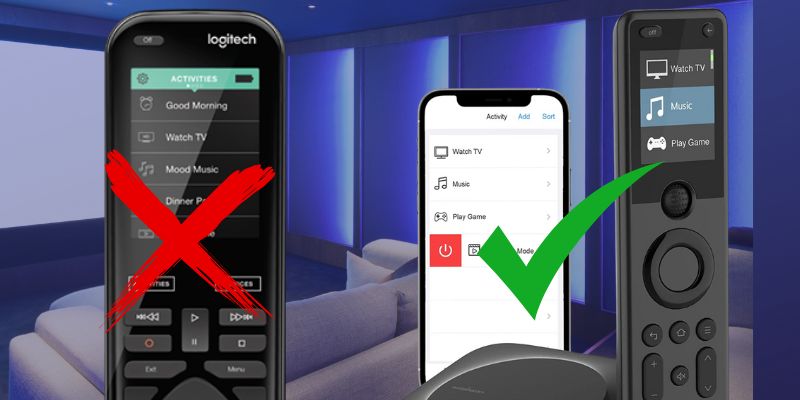
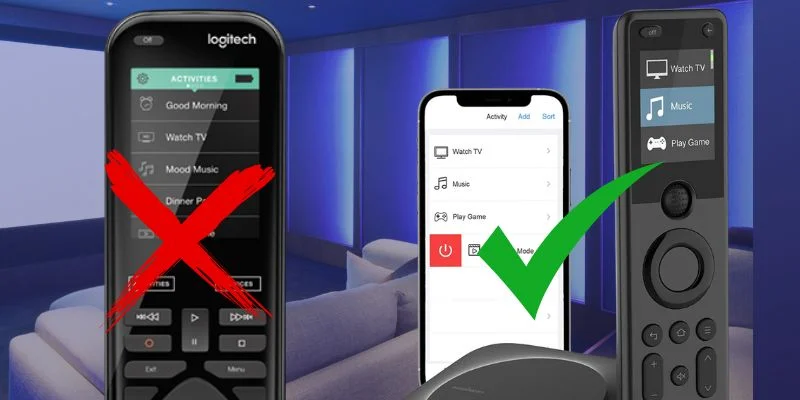
In this article, I explore the seven best Logitech Harmony remote alternatives that you can get right now.
Life After Logitech Harmony
 After nearly a decade blogging about universal remotes, I was disappointed when the Harmony Elite and Harmony Hub were discontinued along with the rest of the Harmony line.
These devices were my go-to for controlling everything from my TV streaming to game consoles to smart home devices.
As discussed in this Audioholics article, the Harmony discontinuation marked a major shift for home entertainment enthusiasts. Logitech assured users ongoing support for the Harmony line, but many are seeking alternatives.
Fortunately, there are some solid harmony remote alternatives. While none really match Harmony’s sophistication, at least one comes close.
Whether you need to manage IR devices or control your cable box, these new remotes offer a range of capabilities. From handling streaming devices to remotes with seamless mobile apps, I hope this article helps you find a suitable Harmony replacement.
Comparison Table: Top 5 Harmony Remote Alternatives
The following table compares the key features of the best Logitech Harmony remote alternatives side by side.
| Premium Touchscreen | Value Hub | Rechargeable LCD | Alexa Voice Control | App Control | |
|---|---|---|---|---|---|
| Product Image |

|

|

|

|

|
| Model | SofaBaton X2 | SofaBaton X1S | SofaBaton U3 | Amazon Fire TV Cube | BroadLink RM4 Pro |
| Rank | 1 | 2 | 3 | 4 | 5 |
| Control Method | Bluetooth, IR, RF, Wi-Fi | Bluetooth, IR, Wi-Fi | IR, Bluetooth/BLE, learnable RF | IR, Bluetooth, Alexa voice | IR, Wi-Fi, Bluetooth |
| Smart Home Integration | |||||
| Devices Supported | 60+ | 60+ | Compatible IR, Bluetooth, and RF gear | Alexa-enabled devices | 50+ |
| Backlit Buttons | |||||
| Voice Control | Alexa and Google Home | Alexa and Google Assistant | Google voice on compatible Bluetooth devices | Alexa built in | Alexa and Google Assistant |
| Mobile App | SofaBaton app | SofaBaton app | SofaBaton app | Alexa app | BroadLink app |
| Display | 2.4-inch HD touchscreen | 2.0-inch OLED | 2.4-inch LCD | No display | No display |
| Battery Life | 30 days; charging dock | 45-60 days; rechargeable Li-ion | 1200mAh rechargeable; USB-C | Always plugged in | USB powered |
| IR Range | Up to 40 feet with hub | 40 feet with hub | Built-in IR; optional R1 repeater | Standard room coverage | Standard room coverage |
| Supported Smart Devices | AV gear, smart-home devices, Home Assistant | Smart lights and AV devices | Compatible TVs, streamers, and audio gear | Smart TVs and AV devices | Home theater, AV, and smart devices |
| Check Price | Check Price | Check Price | Check Price | Check Price | Check Price |
SofaBaton X2
SofaBaton X1S
SofaBaton U3
Amazon Fire TV Cube
BroadLink RM4 Pro
#1 – SofaBaton X2: Editor's Choice
Best Fit
Choose the X2 for premium hub control with a touchscreen.
The Sofabaton X2 is the most promising option I’ve tested so far among the best Logitech Harmony remote alternatives. As a Sofabaton partner, I just received the X2, got it out of the box, and started setting it up and putting it through some initial testing. Right away, I was encouraged by what I saw. The setup process has been improved, the remote feels more premium in my hand, and they finally added a touchscreen to replace the clunky scroll wheel of the other models.
I’ve tested every generation of SofaBaton remotes to date, and the X2 is easily the most Harmony-like remote the company has made yet. The 2.4-inch touchscreen is a big step forward, giving it a more polished, premium feel, while the included hub adds the kind of whole-room control Harmony users have been missing.
Between the touchscreen interface, one-touch activities, broad device compatibility, and smart home integration, this feels like the first Sofabaton remote that can confidently step into that Harmony-style role.
Video Review
Video Credit: TecTimmy
Pros
- Touchscreen feels like a major upgrade
- Most Harmony-like Sofabaton remote so far
- Hub enables strong whole-room control
- Excellent device compatibility
- Custom activities and app-based personalization
- Smart home integration with Alexa, Google Home, and Home Assistant
Cons
- Expensive compared to other universal remotes
- Initial setup takes time and requires some tech savvy
- Still early in testing
The X2 is Sofabaton's new flagship remote with a touchscreen, charging dock, and improved smart home control.
#2 – SofaBaton X1S: Value Hub
Best Fit
Choose the X1S for hub-based activities below the X2 price tier.
The Sofabaton X1S is one of the best harmony remote alternatives available. It offers seamless control for over 60 devices using Bluetooth, IR, and Wi-Fi, making it a strong option for those looking to replace the Harmony Elite. Its OLED display simplifies switching between devices, and the integration with smart home devices adds significant convenience.
During my testing, I found the X1S worked perfectly with a range of devices, including Apple TV, set-top boxes, and even older IR devices like my DVD player. If you’re seeking a powerful, reliable alternative to Logitech Harmony remotes, the X1S is your top choice.
📚 Related: Sofabaton X1s vs U2 Comparison
Video Review
Video Credit: TecTimmy
Pros
- Controls 60+ devices
- Excellent smart home integration
- Long battery life
- OLED display for intuitive control
- Supports Alexa and Google Assistant
Cons
- Initial setup can be complex
- Limited control over smart lighting
📚 Related: Sofabaton X1s vs U2 Comparison
SofaBaton is offering my readers $10 off the X1S remote. Click below and check the box on the Amazon product page to claim it.
#3 – SofaBaton U3: Rechargeable LCD Pick
Best Fit
Choose the U3 for rechargeable physical controls without a Wi-Fi hub.
SofaBaton U3 belongs among the best Logitech Harmony remote alternatives when you want physical controls without adding another Wi-Fi hub. It handles compatible IR and Bluetooth/BLE gear, learns supported 433/315 MHz RF commands, and puts a 2.4-inch LCD above the familiar scroll wheel.
I have tested earlier SofaBaton remotes, but I have not completed my own U3 review yet. The rechargeable 1200mAh battery, USB-C charging, macros, and optional R1 repeater are meaningful upgrades, while Google voice and Air Mouse support still depend on the Bluetooth device you connect.
Video Review
Video Credit: MikeTheTech
Pros
- Rechargeable 1200mAh battery with USB-C charging
- Physical buttons and a clear 2.4-inch LCD
- Controls compatible IR and Bluetooth/BLE devices
- Learns supported 433/315 MHz RF commands
- Supports macros and up to three Bluetooth connections
Cons
- No Wi-Fi or broad smart-home hub
- Voice and Air Mouse support are device-dependent
- My own hands-on U3 review is still pending
#4 – Amazon Fire TV Cube: Best Voice Control
Best Fit
Choose the Fire TV Cube for hands-free Alexa entertainment control.
For users who prefer voice commands, the Amazon Fire TV Cube is another one of my favorite Harmony remote alternatives. It works seamlessly with Alexa-enabled devices and offers hands-free control over a range of IR devices, smart home gadgets, and streaming services.
In my experience, the Fire TV Cube was ideal for controlling TVs, soundbars, and streaming devices without needing a physical remote. It’s not as feature-rich as more complex universal remote controls, but for voice control and smart home management, it excels.
Video Review
Video Credit: Tech Spurt
Pros
- Hands-free Alexa control
- Easy voice setup
- Smooth integration with smart home devices
- Great for controlling streaming apps
- Convenient for multi-device setups
Cons
- No physical buttons
- Limited to Alexa ecosystem for smart control
📚 Related: Fire TV Cube 3rd Gen vs 2nd Gen
Hands-free 4K streamer with Alexa, Wi-Fi 6E, and HDMI input.
#5 – BroadLink RM4 Pro: Best App
Best Fit
Choose the RM4 Pro for app-first IR and RF control.
The BroadLink RM4 Pro is an excellent choice for users seeking harmony remote alternatives that rely heavily on mobile control. The BroadLink app provides customization and supports voice control through Alexa and Google Assistant, making it ideal for smart home enthusiasts.
When I tested the RM4 Pro, it controlled everything from my blu-ray player to smart speakers effortlessly. The mobile app was intuitive, allowing me to set up advanced routines, although it took some time to configure everything. For users who value app control, the RM4 Pro is an excellent alternative to Logitech Harmony devices.
Pros
- Affordable
- Strong mobile app for customization
- Alexa and Google Assistant support
- Controls smart home devices and IR systems
- Works with multiple routines and macros
Cons
- Complex initial setup
- No physical remote
#6 – Function101: Best for Apple TV
Best Fit
Choose Function101 for traditional Apple TV buttons without Siri voice control.

I’ve been working with Function101 as an affiliate for over a year now, and the Function101 Button Remote is an excellent solution for anyone frustrated with the standard Apple TV remote. It pairs effortlessly with Apple TV, supporting Bluetooth for seamless connectivity and IR for controlling TVs, soundbars, and receivers. The Function101 remote is simple to set up, and their USA-based phone and email support provide a great backup in case of any setup issues.
The Button Remote handles playback controls easily on apps like Apple TV+, YouTube TV, and Prime Video. It’s a perfect non-Siri alternative, and the dedicated navigation buttons ensure quick access to essential functions like Home and volume control. I found the Function101 Button Remote to be a perfect fit for Apple TV users looking for a more traditional, reliable remote.
Pros
- Seamless pairing via Bluetooth and IR
- Controls TV, soundbar, and receiver power and volume
- Dedicated playback navigation buttons
- Works out of the box with Apple TV
- USA-based phone and email support
Cons
- No voice control
- Lacks smart home integration
Function101 is offering my readers special savings on this remote. Click below for their latest deal, or shop at Amazon if you prefer.
#7 – Inteset 4-in-1: Best IR Only
Best Fit
Choose Inteset for basic four-device IR control on a tight budget.

The Inteset 4-in-1 is a budget-friendly option among harmony remote alternatives. It supports basic IR devices like TVs, DVD players, and set-top boxes, offering simple and effective control for users with smaller setups.
I tested it with a basic configuration including a TV and blu-ray player, and while it doesn’t offer advanced features, it performed well for essential tasks. It’s a great low-cost choice for those looking for basic universal remote control functionality.
Pros
- Affordable
- Easy to set up
- Reliable for basic device control
- Good IR range
- Simple button layout
Cons
- Limited to 4 devices
- No smart home or voice control
The Inteset 4-in-1 remote controls up to four devices with backlit buttons and learning capability.
Harmony Remote Alternatives FAQ
1. What is the best universal remote control to replace the Logitech Harmony Elite?
The Sofabaton X2 is the top harmony remote alternative to the Logitech Harmony Elite. The X2 provides full control over various devices, including smart speakers and AV receivers, with Bluetooth connectivity and Alexa integration. The rechargeable battery, charging dock, touchscreen, and easy-to-use smartphone app make it a strong replacement for the Harmony product line.
2. How does the SofaBaton U3 compare to the Harmony Elite?
The SofaBaton U3 is a rechargeable button-based alternative, not a feature-for-feature Harmony Elite replacement. It controls compatible IR and Bluetooth/BLE devices, learns supported 433/315 MHz RF commands, and supports macros, but it does not include a Wi-Fi hub for broad smart-home automation.
3. Are traditional infrared remotes still viable in 2024?
Yes, traditional infrared (IR) remotes remain a reliable choice for controlling individual devices like TVs, DVD players, and set-top boxes. Modern harmony remote alternatives such as the BroadLink RM4 Pro combine both IR and radio frequency for added versatility, making them ideal for controlling different devices in your home theater setup.
4. How does the Sofabaton X1S compare to other harmony remote alternatives?
The Sofabaton X1S stands out among harmony remote alternatives because it supports Bluetooth, IR, and Wi-Fi connectivity, providing seamless integration with smart home devices and new items like smart speakers. It also features an intuitive layout with right buttons for ease of use, offering a modern alternative to the Logitech Harmony Elite.
5. What are the key features to look for in a harmony remote alternative?
When choosing from the best harmony remote alternatives, look for features such as voice control, smartphone app support, hdmi input management, and button mapping. Additionally, remotes like the Sofabaton X1S offer custom user interfaces and single press of a button functionality, making them convenient and easy to use for home automation systems.
6. How easy is the setup process for modern harmony remote alternatives?
The setup process for newer harmony remote alternatives has become straightforward thanks to smartphone apps like the Harmony app and Sofabaton app. These apps guide you with on-screen instructions to configure new devices and adjust settings such as IR extenders, making the programming process smooth and convenient.
Best Logitech Harmony Remote Alternatives: Verdict
 The best Logitech Harmony remote alternatives split into three practical choices based on how much of the room you need to control.
- Choose SofaBaton X2 if you want the closest premium hub-based replacement with a touchscreen.
- Choose SofaBaton X1S if you want hub-based activities without paying for the X2 tier.
- Choose SofaBaton U3 if you want rechargeable physical controls without a Wi-Fi hub.
Check the exact device profiles before buying, especially when voice, Bluetooth, or RF support is important to your setup.

Love tech? Subscribe for iPhone tips, fun tech tips, unboxings, and reviews.
Subscribe Now