
As an Amazon affiliate, I earn from qualifying purchases.
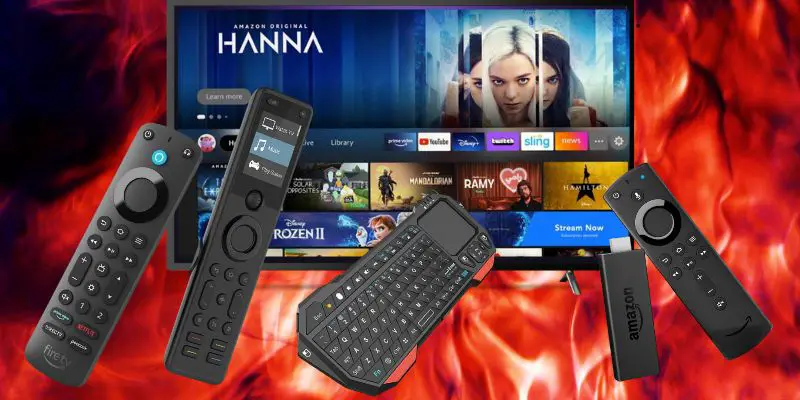
In this article, I am going “all in” to bring you the seven best universal remotes for Firestick you can get this year.
This Stick is On Fire

Yes, you read that right — over thirty-three billion. Quite a haul for such a tiny stick.
Amazon’s Fire TV ecosystem remains a dominant force, with their platform reaching more than 40 million active users. Firestick consistently ranks among Amazon’s top-selling electronics products.
This guide covers the seven best universal remotes for Firestick, including a few budget picks and a premium option.
First, here’s a quick comparison table so you can easily review my top three picks.
Best Universal Remotes for Firestick: My Top 3 Picks
The following table summarizes my top three picks for the best universal remotes for Firestick.
| Premium Pick | Best Alexa | Best LCD Universal | |
|---|---|---|---|
| Product Image |

|
|
|
| Model | SofaBaton X2 | Alexa Voice Remote Pro | SofaBaton U3 |
| Rank | 1 | 2 | 3 |
| Best Fit | Best fitPremium touchscreen and hub control. | Best fitNative Fire TV voice and quick shortcuts. | Best fitTactile multi-device control without a hub. |
| App Control | |||
| Control | IR, Bluetooth, RF, Wi-Fi/IP hub | Bluetooth and IR | IR, Bluetooth/BLE, learned RF |
| Rechargeable | |||
| Power | 1200mAh; charging dock | Two AAA batteries | 1200mAh; USB-C |
| Touchscreen | |||
| Voice | Alexa and Google integrations | Native Alexa | Google on compatible devices |
| Native Fire TV Voice | |||
| Check Price | Check Price | Check Price | Check Price |
SofaBaton X2
Alexa Voice Remote Pro
SofaBaton U3
#1 – Premium Pick: SofaBaton X2
Among the best universal remotes for Firestick, the SofaBaton X2 is my premium pick when I want to control my compatible Fire TV Cube, television, soundbar, and other home-theater gear. Its color touchscreen makes device and activity switching more visual, while the hub brings IR, Bluetooth, RF, local IP control, and supported smart-home services into one system.
For a compatible Fire TV setup, use the SofaBaton app to add the exact streaming-device profile and build an activity that powers the room and switches inputs. Customizable activities and macros can reduce a multi-step routine to one action.
Pros
- Color touchscreen for devices and activities
- Customizable one-touch activities and macros
- IR, Bluetooth, RF, and local IP control
- Home Assistant integration
- Hub-based control for compatible entertainment gear
Cons
- Premium price compared with button-only remotes
- Initial device and activity setup takes time
- Native Fire TV voice still requires the Alexa remote
Video Review
Here is a SofaBaton X2 unboxing I filmed over on my TecTimmy YouTube channel.
#2 – Best Alexa: Voice Remote Pro
Alexa, what are the best universal remotes for Firestick?
The Alexa Voice Remote Pro has been a fantastic upgrade to my Fire TV device setup. It’s compatible with various devices, including my Apple TV and Fire TV Cube. I’ve found that the voice commands make navigating through content a breeze.
One of the standout features of the Alexa Voice Remote Pro is the built-in remote finder, making it easy to locate the remote when misplaced. The backlit buttons and two customizable buttons for my favorite devices add extra convenience, while the headphone button allows for easy Bluetooth pairing.
While the Alexa Voice Remote Pro offers many great features, it is worth noting that the remote is more expensive than other options on the market and may not be compatible with older Fire TV devices. However, the added convenience and ease of use make it a worthwhile investment.
Pros
- Compatible with Fire TV devices
- Built-in remote finder
- Backlit buttons & customizable buttons
- Easy Bluetooth headphone pairing
- Voice commands for easy navigation
Cons
- Higher price point
- Not compatible with older Fire TV devices
Upgraded Alexa remote for Fire TV devices includes a remote finder and backlit buttons.
#3 – Best LCD Universal: SofaBaton U3
Next on my list of best universal remotes for Firestick is the SofaBaton U3. I’ve owned and tested numerous SofaBaton remotes, and OneSmartCrib is a SofaBaton partner. Based on SofaBaton’s current documentation, its standout upgrade is a 2.4-inch non-touch LCD with a scroll wheel; turn the wheel to browse devices, then press it to select.
For a compatible Fire TV setup, I like the U3 as one remote for the streamer, TV, soundbar, and other supported gear. One-touch macros can simplify everyday routines, but the U3 is not an Alexa Voice Remote; Google voice and Air Mouse work only on supported Bluetooth devices. Verify the exact Fire TV profile, keep the Alexa remote for native voice and Fire TV-specific features, and remember that IR needs line of sight without the optional R1 repeater.
Pros
- Clear 2.4-inch non-touch LCD
- Tactile scroll-and-press navigation
- Three simultaneous Bluetooth connections
- One-touch macros for Fire TV routines
- USB-C charging plus IR/RF support
Cons
- No native Alexa voice control
- Exact Fire TV profile requires verification
- Line-of-sight IR without optional R1
#4 – Best App: Broadlink RM4 Pro
The Broadlink RM4 Pro is an affordable solution to make your home smarter, allowing you to control various remote-controlled devices through your phone app or with Alexa or Google Assistant. With an IR and RF blaster, the RM4 Pro connects to your Wi-Fi network and enables you to control devices such as TVs, fans, motorized curtains, humidifiers, cameras, light switches, and more.
Despite its low cost, the RM4 Pro does have some limitations. Setting up the device might take some time, requiring a line of sight to the devices it controls. Moreover, it’s not readily compatible with Apple HomeKit. However, the RM4 Pro does support a temperature and humidity sensor (sold separately), which allows you to create automation based on environmental conditions. Overall, the Broadlink RM4 Pro is excellent value, especially for those looking to automate their homes on a budget.
Pros
- Affordable home automation
- Controls a wide variety of devices
- Voice control with Alexa and Google Assistant
- Optional temperature and humidity sensor add-on
Cons
- Takes time to set up
- Not readily compatible with Apple HomeKit
- Needs to be in line of sight of devices
#5 – Best Keyboard: WeChip W2 Pro
OK, while this remote requires a hack with Firestick, I just had to include it here. Let me start off with the hack. It requires an on-the-go (OTG) adapter cable to use it with Firestick. This is because you need to plug in a USB dongle to use the remote. You can pick up both the remote and the adapter over at Amazon for a fraction of the cost of the Sofabaton remotes here.
There are two very cool things about this remote. The first is that it has simple-but-standard remote controls on one side, and on the other is a full-fledged Qwerty keyboard. This can be useful not just for searching for content on your Firestick but also for navigating YouTube and other content. The second cool thing is that it functions as an “air remote.” This means that you wave it around in the air like a wand, and it does stuff. Very Harry Potter.
Pros
- Remote, air remote, and keyboard in one
- Long battery life, lasts weeks after a single recharge
- Budget friendly
- Great for elderly and kids
- Anti-lost function triggers alarm when button is pressed on dongle
Cons
- Not compatible with all Smart TV
- Won’t integrate with Alexa or Google
- Buttons are not backlit
- Voice remote is inconsistent
- Requires USB port (for Firestick this means you’ll need an OTG cable)
- A few people reported issues with unresponsive volume control when used with Firestick
- No home button
Video Review
Check out this video from Free Tech if you can handle a very bad joke and few cuss words.
#6 – Mini Keyboard: Fosmon Mini
While this isn’t a universal remote per se, it is a great little keyboard that will let you navigate around Firestick like a champ.
So, if you want a pure-play keyboard to navigate your Firestick, the Fosmon is a great and super affordable way to go. At least one YouTuber I know (AtReef) has called this product “life-changing.” I agree. I now have two remotes on my coffee table. This remote keyboard and the Sofabaton X1S. I used to have seven remotes to control my home theater setup.
I use my Fosmon Mini mostly for YouTube, but it also works great for searches on other streaming services, including Firestick.
Pros
- Fully functional mini keyboard and trackpad
- Feels solid in hand
- Great for a home theater PC
- Can connect up to your PC as well as Firestick
- Can navigate Firestick using trackpad and arrow keys
Cons
- None at this price
- No traditional remote capabilities
- Keyboard and trackpad only
Video Review
Checkout this helpful demo video from my man Lew over at Unbox Therapy.
#7 – Alexa Remote Add-on: Sideclick
Last but not least on my list of best universal remotes for Firestick is this innovative clip-on remote.
If you want to extend your existing Fire TV remote with some extra functionality, then the Sideclick Universal Remote attachment is worth a look. Setup is easy if you have the original remotes you want to replace. If not, don’t buy this; there is no way to set it up without the existing remote. The main thing this does is let you control a couple of other devices, all from the same place.
If you are constantly fumbling around primarily with your TV remote, Firestick remote, and soundbar remote, this may be a good fit.
Pros
- Inexpensive snap-in for existing Fire remotes
- Extends functionality
- Can control most TVs, Fire TV, soundbar, and Blu-ray from a single remote
- Learns from an existing remote
- Customizable buttons for your devices
Cons
- Requires original remote(s) for setup
- Requires separate batteries
- No support for activities
- No keyboard
Video Review
Here is a nice unboxing of the Sideclick remote from Neville’s Tech:
Best Universal Remotes for Firestick: Final Verdict
 The best universal remotes for Firestick come down to whether you want premium whole-room control, native Alexa, or tactile multi-device control.
- Choose SofaBaton X2 if you want premium touchscreen activities and hub control for compatible room gear.
- Choose Alexa Voice Remote Pro if native Fire TV voice, backlit buttons, and remote finder matter most.
- Choose SofaBaton U3 if you want a rechargeable LCD-and-scroll-wheel universal without a Wi-Fi hub.
Check the exact Fire TV profile and keep the original Amazon remote nearby for model-specific voice and setup functions.

Love tech? Subscribe for iPhone tips, fun tech tips, unboxings, and reviews.
Subscribe Now