As an Amazon affiliate, I earn from qualifying purchases.
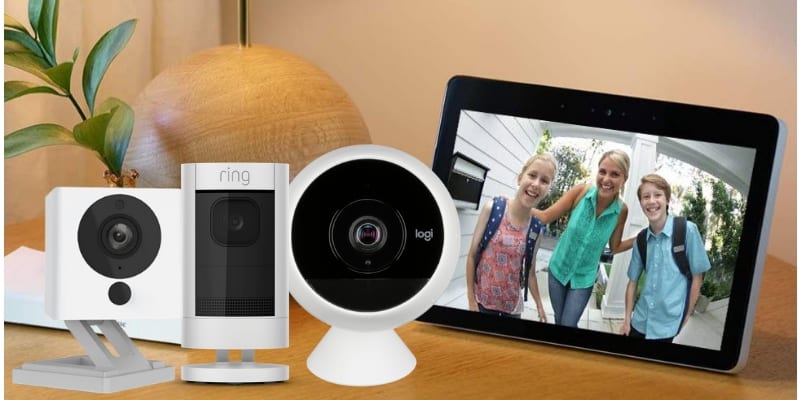
In this guide, I’ll review the best Echo Show compatible cameras to help you monitor your home more easily with Alexa and now Alexa+.
A Camera for Every Echo Show
 I’ve used several Echo Show compatible cameras, and the ability to pull up live video with a simple voice command is genuinely useful for everyday home monitoring.
As Amazon expands the Echo Show lineup-from the Echo Show 5 to larger wall-mounted 15″ and 21″ displays-camera integrations have become part of how these devices are used, especially with the introduction of Alexa+.
Alexa+ connects camera views and routines to remembered actions and habits, making it easier for Echo Show devices to show the right camera feed on demand.
According to recent smart display market research from Mordor Intelligence, adoption is growing like crazy.
Echo Show compatible cameras now work with the Echo Show 21, 15, 11, 8, and 5, while older discontinued models still support basic camera features.
How I Chose These Cameras
I own and have extensively tested the top three cameras on my list. For the rest, I spent a full day reviewing hands-on YouTube comparisons and specs to confirm they reliably stream to Echo Show, respond to voice commands, and integrate with the Alexa app.
Comparison Table: Best Echo Show Cameras
Next, I’ll include a handy price comparison table of my top picks for the best Echo Show compatible cameras in a single table.


Last update on 10/01/2026 / Affiliate links / Images from Amazon Product Advertising API
#1 – Best Budget Cam: Wyze Cam v4

I’m not technical at all and this took me less than 10 minutes to set up.Kara from Massachusetts
First on my list of best Echo Show compatible cameras is the Wyze Cam v4. It continues to deliver the best value of any camera I’ve researched or tested, now offering 2.5K QHD video resolution and improved color night vision. It works well with Echo Show devices as a live video feed, delivering strong performance at a very low price.
All paranoia aside, this remains an incredible value. The updated color night vision stands out for the category. I bought the previous version for my non-techie sister last year, and she had it running in about 10 minutes. She still uses it to keep an eye on-and scold via two-way talk-her carpet-chewing dog while working 30 miles away.
Pros
- Incredibly affordable
- 2.5K QHD video resolution with enhanced color night vision
- IP65-rated for indoor and outdoor use
- Zone detection
- Free cloud storage (short event clips; extended history requires Cam Plus)
- Continuous recording to a MicroSD card (sold separately)
Cons
- No onboard memory; requires a MicroSD card or subscription for extended recording
- Motion detection can result in false alerts in high-traffic areas
- Wired connection only; no battery backup for placement flexibility
Video Review: Wyze Cam
LifeHackster has a nice review of the Wyze Cam V4 out on YouTube. I’ll embed it below.
Amazon Alexa and Alexa+ Commands
To see your live Wyze Cam feed, you can say:
- “Alexa, show me the baby room.”
- “Alexa, show my bedroom.”
- “Alexa, show the back yard.”
- “Alexa, show me doggie cam.”
To stop your Wyze Cam live stream you can say:
- “Alexa, stop.”
- “Alexa, go home.”
Pro Tip: Alexa commands are similar for many of the cameras here but some cameras are more limited in how they interact with the Echo Show. If this is a concern, make sure you review the manufacturer’s documentation before you choose a camera.
Where to Get It
#2 – Budget Plus: Wyze Cam Pan v3

For a little more money, the Wyze Cam Pan V3 is an equally affordable security camera with many of the same features as the Wyze Cam, plus a few extras. And the additional cost is trivial – at least at the time of this writing.
The Wyze Cam Pan is best when you want the visibility of an entire room or the versatility of an indoor-outdoor camera. It lets you pan and tilt the lens to give you a 360° horizontal and 93° vertical viewing range (using the Wyze app). Wyze Cam Pan also has a different IR based night vision, thanks to six IR LEDs instead of the four that come with a regular Wyze Cam. Oh, and it works with Alexa and Google Assistant too.
Pros
- IP65 rated for indoor/outdoor use
- Pan, tilt, digital zoom the camera remotely using the Wyze app
- Motion tracking tracks motion at 110° per second and provides all-directional coverage (horizontal 360°, vertical 93°)
- “Pan Scan” mode auto rotates the camera to get a full view of a room
- Infrared night vision provides clear images up to 30 feet away
- Can be mounted to a standard camera tripod or mount
Cons
- Requires subscription to Cam Plus if you want to capture extended motion history and store clips in the Cloud
- Cannot be reliably used for daisy-chaining
Video Review
Here’s a video from my boy Brian over at Automate Your Life that shows how easy it is to set up the Wyze Cam Pan:
Where to Get It
#3 – Wyze Alternative: Blink Mini 2

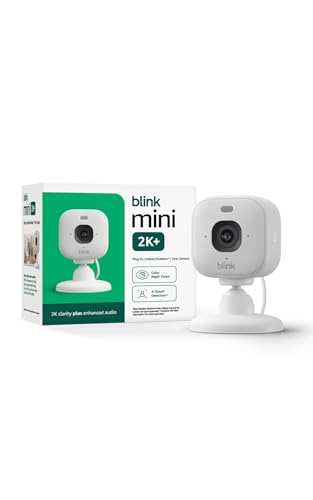
Another solid budget camera for indoo or outdoor use is the Blink Mini 2. In case you didn’t know, Amazon owns Blink, which is essentially Amazon’s answer to the Wyze Cam. The thing that encourages me the most about this little camera is that it has scored so many positive reviews since being released.
Also, since this is an Amazon product, chances are they will have some great bundle deals with this camera and the Echo Show for events like Prime Day, Black Friday, Cyber Monday, etc.
Here’s a pic of my latest Amazon purchase still in the box (sigh):

I haven’t had a chance to take this out of the box yet, but I plan on creating a setup video over at my TecTimmy YouTube channel very soon.
Update! I finally got this out of the box. You can check out my review comparing Blink Mini vs Wyze Cam and Wyze Cam Pan. YouTube video to come!
Pros
- Most affordable Blink camera
- 1080p HD video quality at an affordable price
- Motion detection and two-way audio
- Color night vision with built in spotlight
- Smartphone alerts
- IP65-rated for indoor or outdoor use when paired with the weather-resistant power adapter
- Alexa/Echo Show commands to stream live, play recorded clips, and arm/disarm the camera
Cons
- Video quality not as good as Wyze Cam
- Requires Blink Sync Module 2 for local video storage via USB
- Cloud subscription required unless using Sync Module 2
#4 – Budget Alternative: SwitchBot

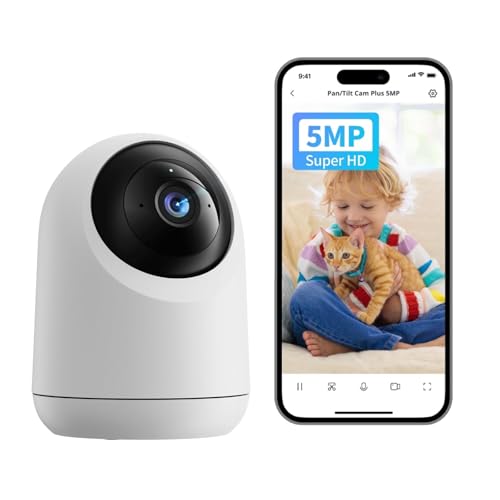
The SwitchBot Pan/Tilt Cam Plus 3K (5MP) is a capable budget-friendly security camera that integrates well with Echo Show devices. It earns a spot among the best Echo Show cameras if you want solid Alexa features without paying premium-brand prices.
It offers a wide 130° field of view, sharper-than-1080p video, and smooth pan-and-tilt control. Motion events can trigger live video on your Echo Show using Alexa routines, and two-way talk works directly from the Echo Show, no phone required.
Where it really shines is ecosystem integration. When paired with SwitchBot door or light sensors, you can trigger live video based on doors opening or lighting changes-adding practical automation beyond basic motion alerts.
Pros
- Sharp 3K (5MP) video with 130° field of view
- Live streaming and two-way talk on Echo Show
- Local SD card recording with optional cloud storage
- Pan-and-tilt with reliable IR night vision
- Powerful automations with SwitchBot sensors
Cons
- Requires a SwitchBot Hub for Alexa integration
- Cloud storage requires a subscription
- No continuous 24/7 recording
Video Review: SwitchBot Security Camera
Don’t take my word for it; here’s what smart home guru (and my hero!) Paul Hibbert had to say:
Where To Get It
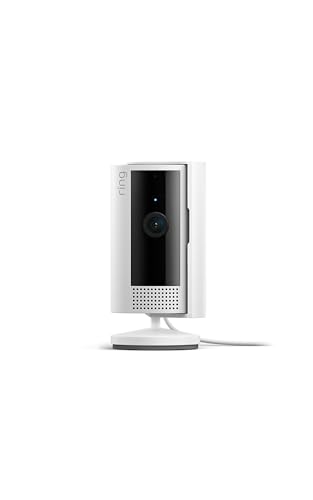
#5 – Feature Packed: Ring Indoor

The Ring Indoor Cam is a reliable, plug-in option that earns its place among the best Echo Show cameras for indoor monitoring. Because it’s wired, you don’t have to manage batteries, and reliability is excellent for everyday use.
It delivers 1080p HD video with live view, allowing you to instantly stream footage to an Echo Show or check in anytime via the Ring app. Two-way talk works seamlessly through the Echo Show, making it useful for checking on pets, kids, or deliveries.
Installation is simple, with an included wall mount and a compact design that fits easily into most rooms. If you’re already in the Ring ecosystem-or want dependable Alexa alerts-this is an easy, low-cost pic

Pros
- Plug-in design with consistent performance
- Live view and motion alerts on Echo Show
- Clear 1080p HD video with two-way talk
- Wide field of view for larger rooms
- Excellent Ring app and customer support
Cons
- Cloud recording requires a subscription
- Indoor use only
- Requires an available power outlet
Where to Get It

Compact indoor camera with privacy cover, motion alerts, and two-way talk.
#6 – Most Versatile: Ring Stick Up Cam

The Ring Stick Up Cam is one of the most flexible options on this list and a strong contender among the best Echo Show cameras for both indoor and outdoor use. It’s ideal if you want one camera that can adapt to different locations.
Its biggest advantage is power flexibility-you can run it wired, battery-powered, or solar, depending on how and where you install it. Live video streams cleanly to Echo Show devices, and motion alerts are fast and reliable.
With weather resistance, night vision, and optional solar charging, it works just as well outside as it does indoors. Add a Ring Protect plan, and you get cloud video history with easy playback across devices.

Pros
- Three power options: wired, battery, or solar
- Works indoors or outdoors
- Live view and Alexa voice control on Echo Show
- Solid 1080p video with night vision
- Flexible mounting (flat surface, wall, or ceiling)
Cons
- No free cloud video history
- Subscription required for video playback
- Battery performance drops in very cold temperatures
Video Review: Ring Stickup Cam
Here’s an excellent review of the Stickup Cam features and installation from our friends at TechGadgetsCanada.com:
Erin, are you single? Call me! ? LOL.
Ring Stickup Cam Amazon Alexa Commands
To see your Ring feed, you can say:
- “Alexa, show the living room.”
To stop your Ring feed, you can say:
- “Alexa, hide the living room.”
- “Alexa, stop.”
- “Alexa, go home.”
To see your most recent video clip on Ring, you can say:
- “Alexa, show me the last activity from the living room.”
- “Alexa, show the most recent event from the garage.”
- “Alexa, pause.”
- “Alexa, stop.”
Where to Get It

#7 – Budget Night Vision: Wansview

The Wansview Pan/Tilt Security Camera is a lesser-known budget option that still earns a spot among the best Echo Show cameras, especially for pet or baby monitoring. It’s popular with parents thanks to its reliability and strong low-light performance.
While I haven’t personally owned this model, extensive research shows consistently high marks for stability, motion alerts, and night vision clarity. It supports live streaming to Echo Show, two-way audio, and smart motion notifications through Alexa.
Unlike many low-cost cameras, Wansview adds pan/tilt control and enhanced infrared night vision, making it more versatile than typical fixed-lens budget cams. If you want an affordable indoor camera without locking into a major ecosystem, this is a solid pick.
Pros
- Affordable 1080p HD video
- Live view and two-way talk on Echo Show
- Smooth pan/tilt with wide coverage
- Strong IR night vision for low-light rooms
- Supports local microSD and optional cloud storage
Cons
- No 5GHz Wi-Fi support
- App experience is basic
- Indoor use only
Where to Get It
#8 – Best Outdoor Security: Arlo Pro 5S

The Arlo Pro 5S Spotlight Camera is a premium outdoor option and one of the most advanced Echo Show cameras available. If video quality and security features matter most, this camera clearly stands apart.
It delivers sharp 2K HDR video, streams cleanly to Echo Show devices, and supports color night vision via an integrated spotlight. Dual-band Wi-Fi (2.4GHz and 5GHz) improves connection reliability, especially in crowded networks.
Designed for outdoor use, it includes a siren, spotlight, and two-way talk. Arlo includes a one-year Arlo Secure plan with 30-day cloud storage, after which a subscription is required for recorded video.
Pros
- Crisp 2K HDR video quality
- Dual-band Wi-Fi for stronger connections
- Color night vision with spotlight
- Works indoors or outdoors
- Built-in siren and two-way audio
Cons
- Premium price
- Subscription required after first year
- Battery life varies with heavy use
Video Review: Arlo Pro
onourshelf nails it with this informative Arlo Pro review and set up overview:
Where to Get It
#9 – Budget Two-Pack: Blink Indoor

The Blink Indoor (3rd Gen) camera closes out the list as a simple, affordable option among the best Echo Show cameras for basic indoor monitoring. It’s especially appealing if you want to cover multiple rooms on a budget.
It supports live streaming to Echo Show, Alexa voice commands, and two-way talk. The standout feature is battery efficiency-Blink claims up to two years of battery life under typical usage.
This camera is designed strictly for indoor use and focuses on motion-based recording rather than continuous live feeds. For lightweight monitoring without wires or frequent charging, it does the job well.
Pros
- Up to two-year battery life
- Live view and Alexa voice control on Echo Show
- Simple setup and compact design
- Custom motion zones and alerts
- Two-way talk
Cons
- Requires Sync Module or cloud plan for video storage
- No continuous live feed
- Indoor use only
Where to Get It
Do You Really Need a Security Camera?
To be honest, I was super skeptical about these before I bought one of these Echo Show compatible cameras. Why would I want to peer inside my own empty apartment, I thought.

But then I started reading some of the reviews on Amazon. One guy tells an amazing story about how his Echo Show compatible camera saved his dog’s life while he was at the office. He received a notification showing that his house had caught fire! So, he called a neighbor and the neighbor was able to get the dog out of the house just in time.
One guy tells an amazing story about how his Echo Show compatible camera saved his dog’s life.
There are also several posts among Amazon’s ratings of video footage showing actual robbers getting caught on tape inside customers’ homes and apartments. According to statistics published by Safewise, property crime occurs every 3.9 seconds in the US.
Pretty crazy.
Echo Show Compatible Cameras – Your Turn
I hope you enjoyed reading this review of the best Echo Show compatible cameras.
Do you already own an Echo Show? If so, which model do you own? Do you plan on pairing it with a security camera?
Which of the home security cameras featured here do you like best? Is there a camera not featured here that has caught your eye?
Please leave a comment below and let me know. I would love to hear from you.
📚 Read Next: 9 Best Echo Show Stands

Love tech? Subscribe for iPhone tips, fun tech tips, unboxings, and reviews.
Subscribe Now